Skip to content
PolyBanca

How to use PolyBanca, step by step

Eleven steps from the activation link to the reconciled balance — with real screenshots of the app and a fictional demo book.

Step 1

Before you start

You need four things: a Polymarket account with USDC/pUSD balance on Polygon; the address of your proxy wallet — not the MetaMask one; your license; and a modern browser.

Find the proxy address on polymarket.com: open the user menu and pick “Copy proxy address”. That is the account Polymarket operates for you on Polygon — the one that holds your tokens and your history.

The license comes from the 7-day free trial on this site’s home page: the form writes the Telegram message for you to send, and the license comes back to you.

On a phone, add the app to the home screen (PWA). It is the same app, just in your pocket.
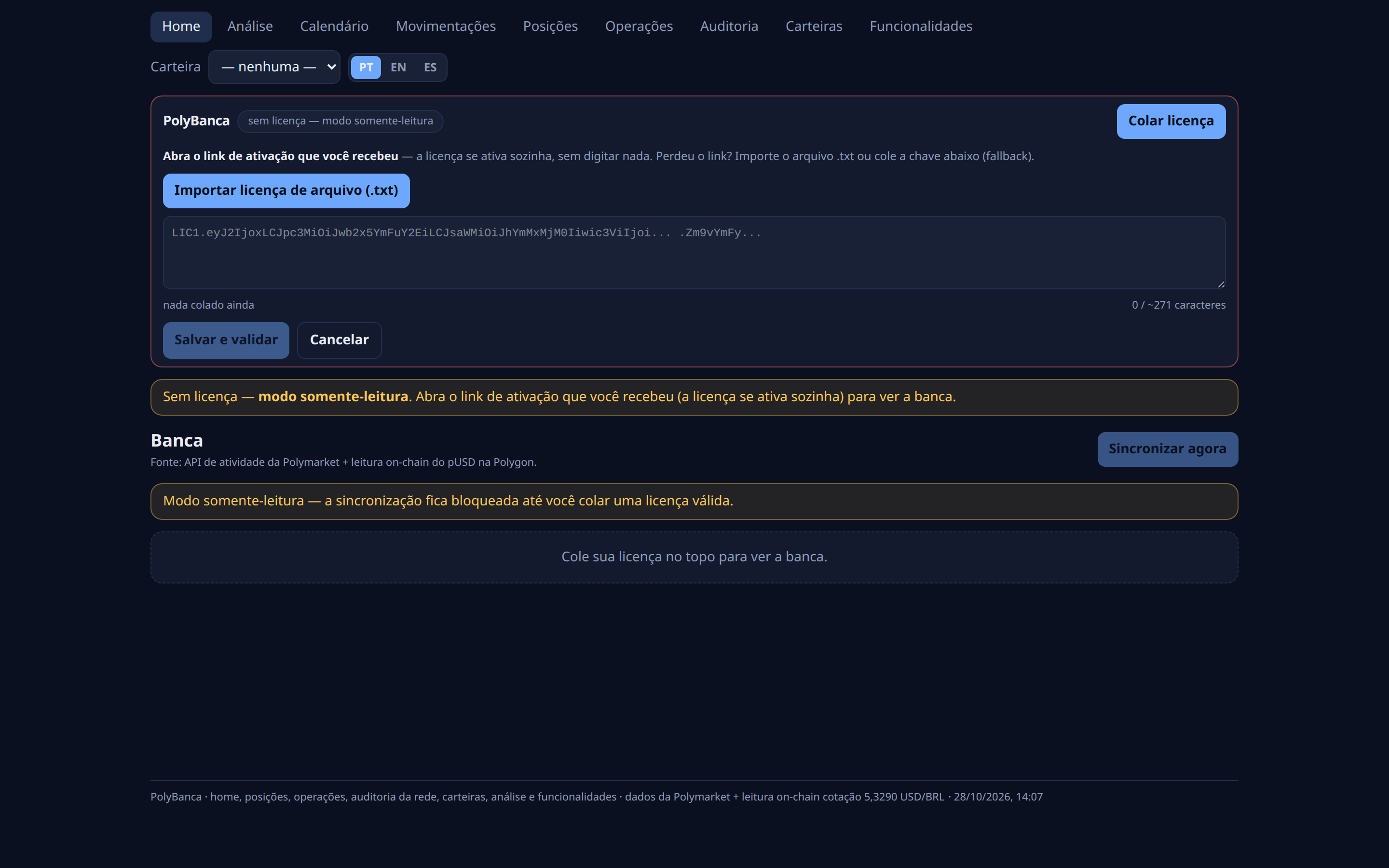
Without a license the app stays in read-only mode, and the activation panel opens on “Paste license”.
Step 2

Activate the license

The main path is the activation link: open it in the browser and the license activates itself — there is nothing to type. The URL is cleaned right after, so it does not stay in your history nor leak to another site.

Lost the link? The top bar has the fallback: “Paste license” opens a box where you paste the license text (it starts with LIC1. and has ~271 characters — the counter tells you if the paste was truncated), or you import the .txt file.

Click “Save and validate”. The check is local: the app verifies the signature, the expiry date and the wallet limit on your own device. Nothing of your balance ever leaves it.

Without a valid license the app runs in read-only mode and the sync stays blocked.

The license panel: the LIC1. field, the character counter and the “Save and validate” button.
Step 3

Register the wallet

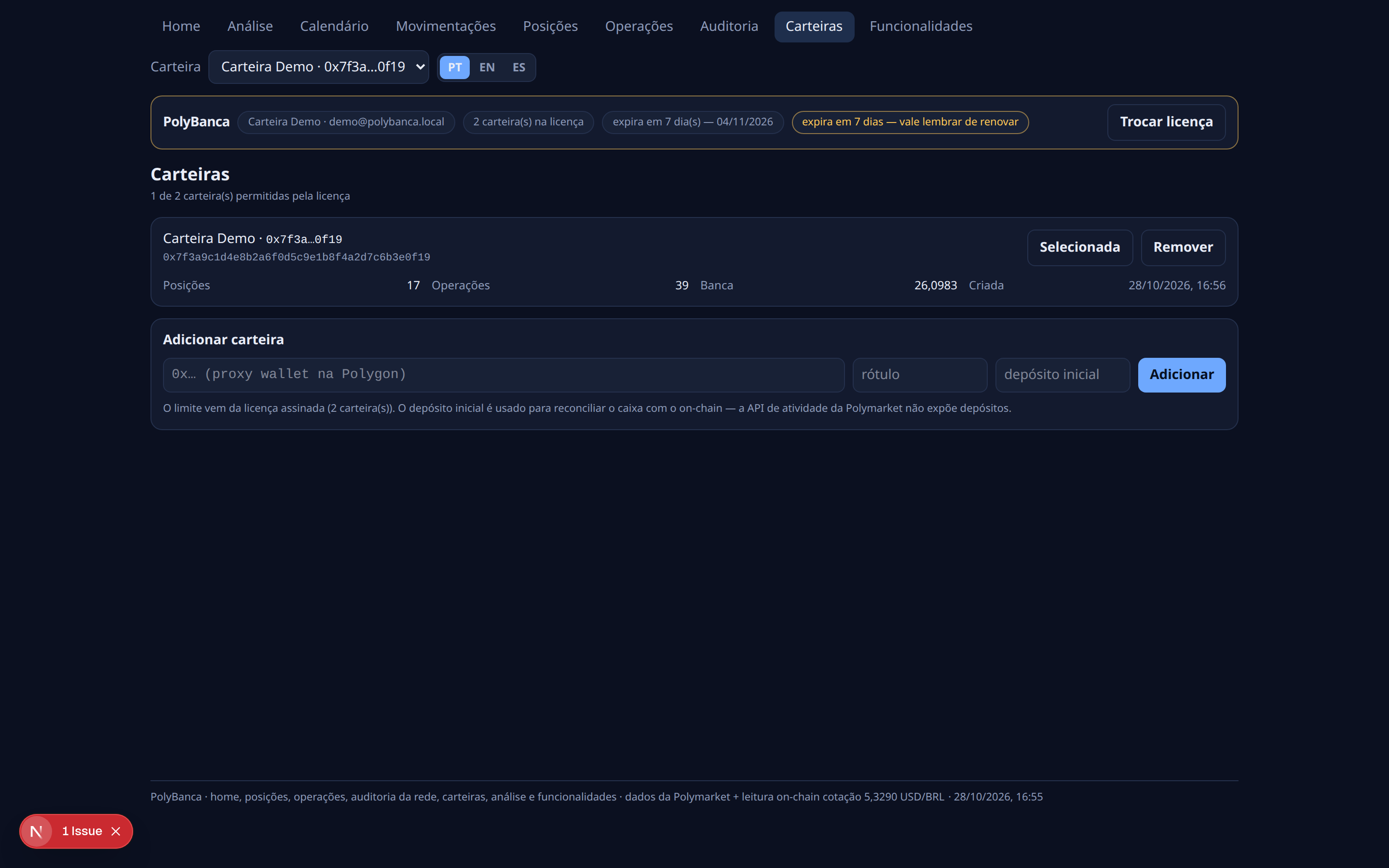
In Wallets, paste the 0x… proxy address, give it a name (e.g. “Demo Wallet”) and save.

The license allows 2 wallets — the second one becomes a tab at the top, next to the first.

The address is used to READ only. The app never moves money: no private key, no signing, no transfer.

Wallets: “Demo Wallet” already added, the field for the second one and the limit of 2 that comes from the license.
Step 4

First sync

Hit “Sync now”. The app fetches three things: your wallet’s public activity on Polymarket (buys, sells, redemptions); the market price of each position (the CLOB, and the Gamma catalogue when needed); and the pUSD balance on-chain on Polygon.

The first sweep takes 10–30 s — it has to walk the whole history.

Nothing is uploaded: the app only reads public data and the chain.

After the first sync the home screen fills up: cash, P&L and the cash curve.
Step 5

Reading the Home

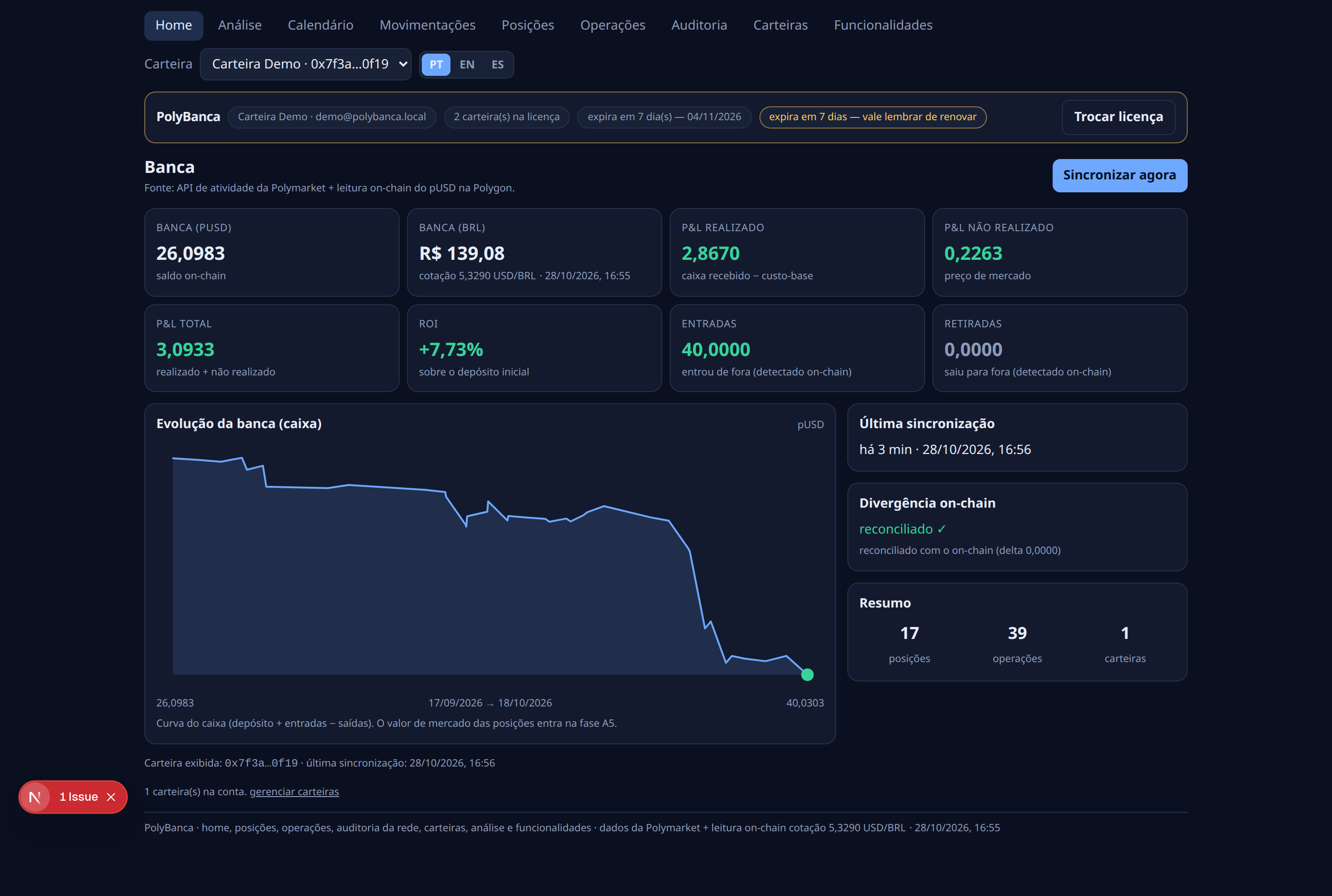
The home screen is the summary: the book (cash plus positions at market price), realized and unrealized P&L, accumulated ROI, the cash curve and the deposits/withdrawals.

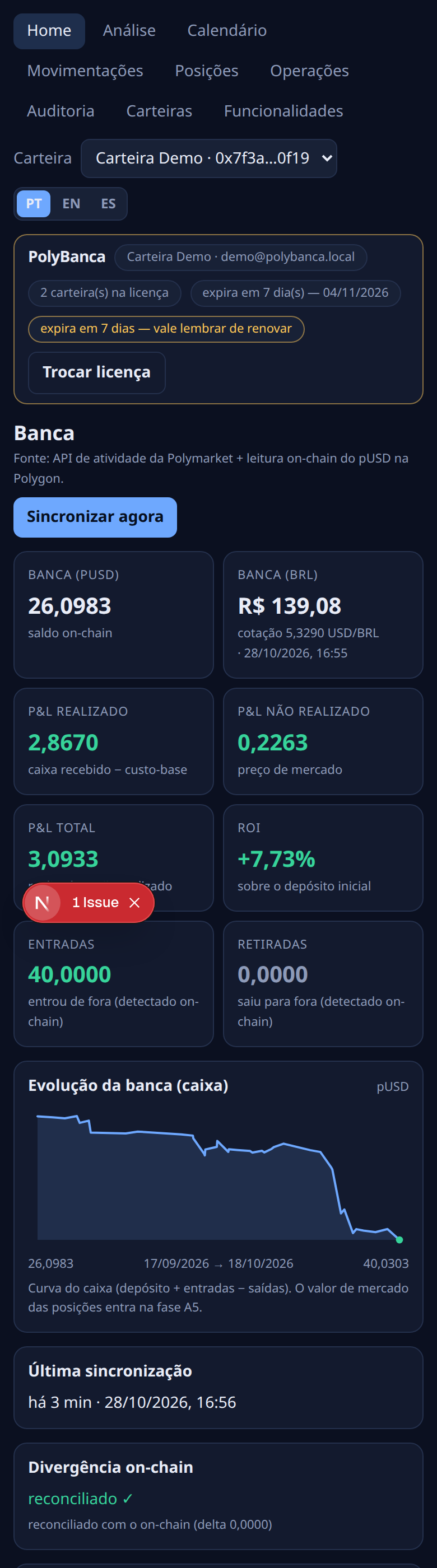
In this demo: cash 26,0983 pUSD (R$ 139,08), realized P&L +2,8670, unrealized +0,2263, total +3,0933, ROI +7,73%, deposits 40,0000 and withdrawals 0,0000.

Every value in reais comes with the USD/BRL rate next to it (in the footer of every screen): the amount in reais is always pUSD × the rate displayed. The rate is only a display conversion — the book itself is always in pUSD.

Home: cash 26,0983 pUSD / R$ 139,08 at a 5,3290 USD/BRL rate, ROI +7,73%.
Step 6

Open positions

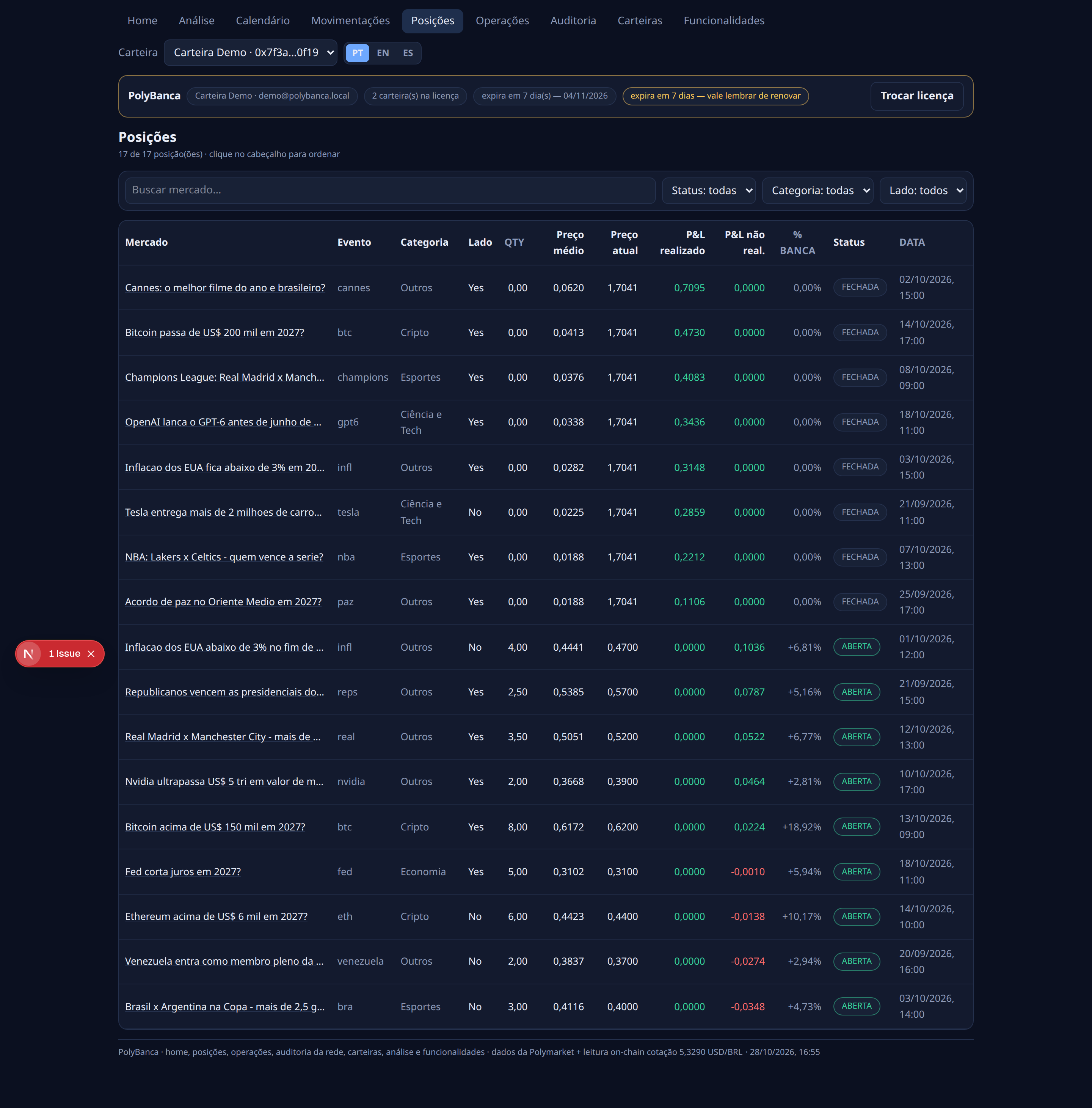
Each row is one market: the title, the side (Yes/No), the size, the average price, the current price, the realized and unrealized P&L, and how much of the book that position is.

The allocation uses the weighted average price of the buys — not FIFO, not LIFO.

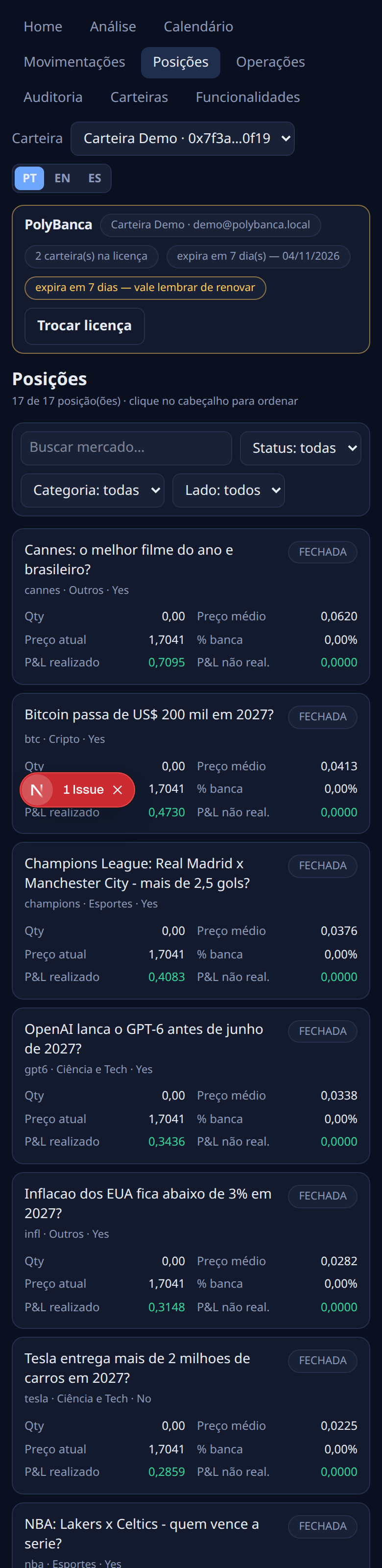
In the demo there are 17 positions: 9 open and 8 closed.

Positions: the 9 open markets with average price, current price and P&L (unrealized total +0,2263).
Step 7

Trade history

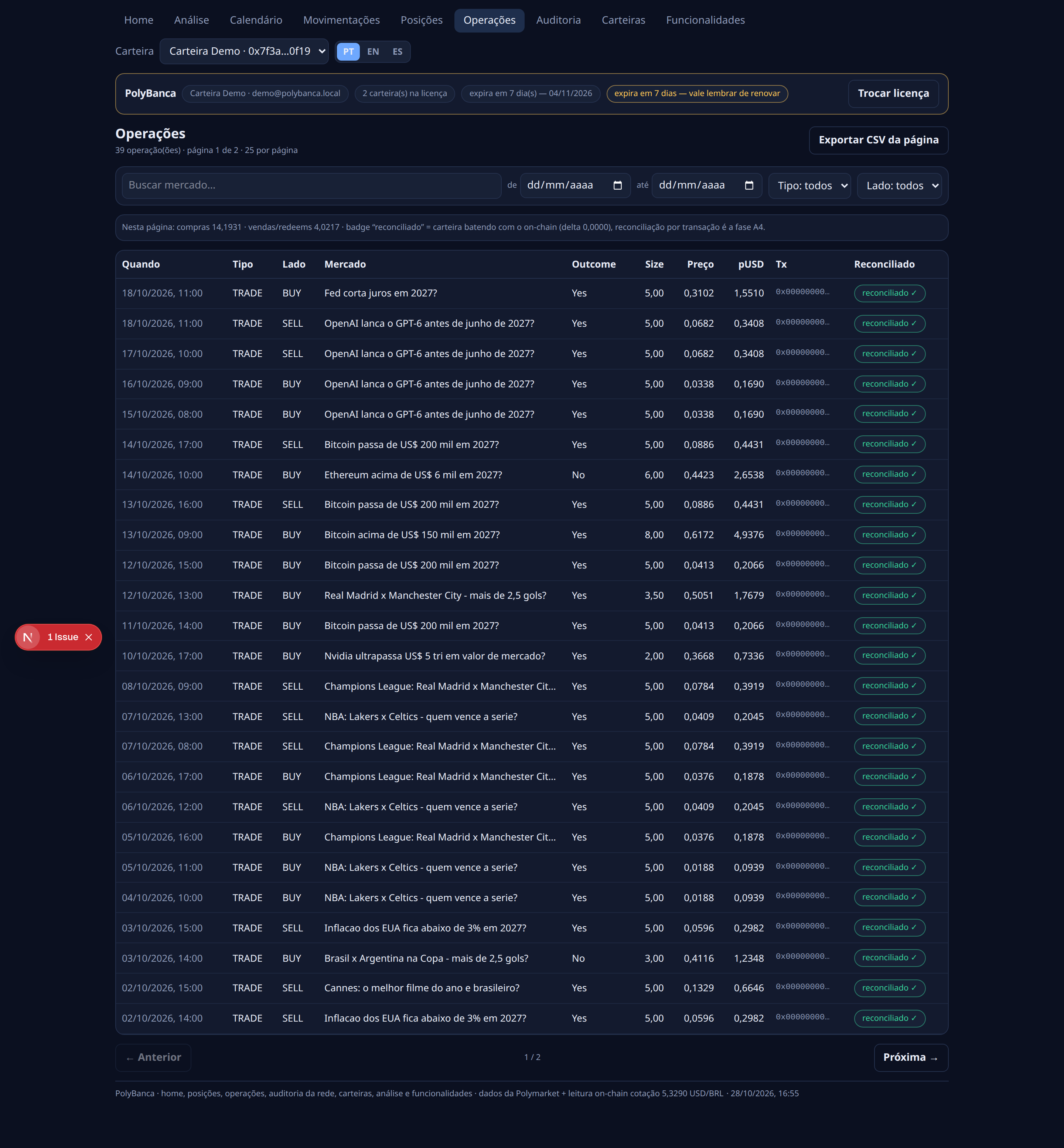
Every trade the public API returned: date and time in UTC, type, side, market, outcome, size, price, the amount in pUSD and the transaction hash.

The hash is how you check the operation on the Polygon explorer — it is the same hash that shows up in the audit table.

There are filters (text, date range, type, side) and a CSV export of the page.

Operations: rows with type, side, price, size in pUSD, tx hash and the “reconciled” badge.
Step 8

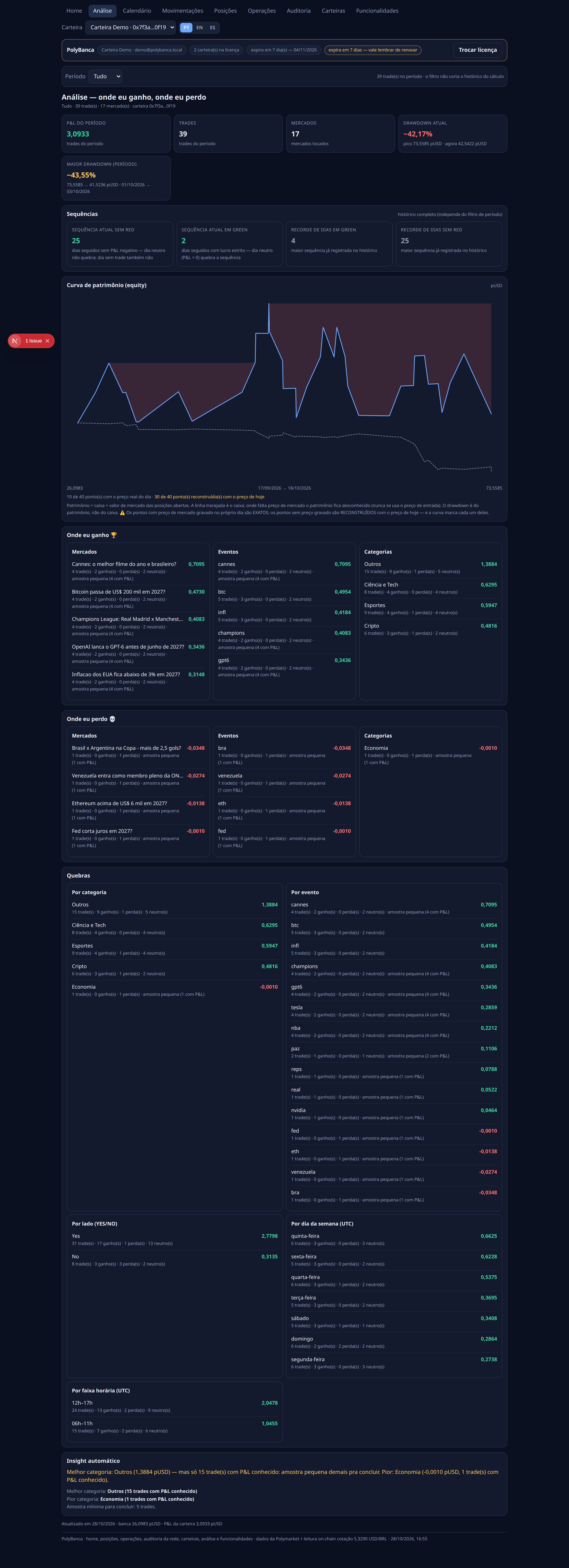
Analysis

The analysis breaks the result down six ways: by market, by event, by category, by side, by weekday and by hour band.

It shows the current drawdown (what is happening right now) and the biggest drawdown of the period (the worst stretch), plus the win/loss sequences.

The unit is the trade, and the unrealized P&L enters diluted by the size of the position.

A category with fewer than 5 operations with P&L gets a “small sample” warning — the app does not draw a conclusion from it.

Analysis: the six breakdowns, the drawdowns and the “small sample” warning.
Step 9

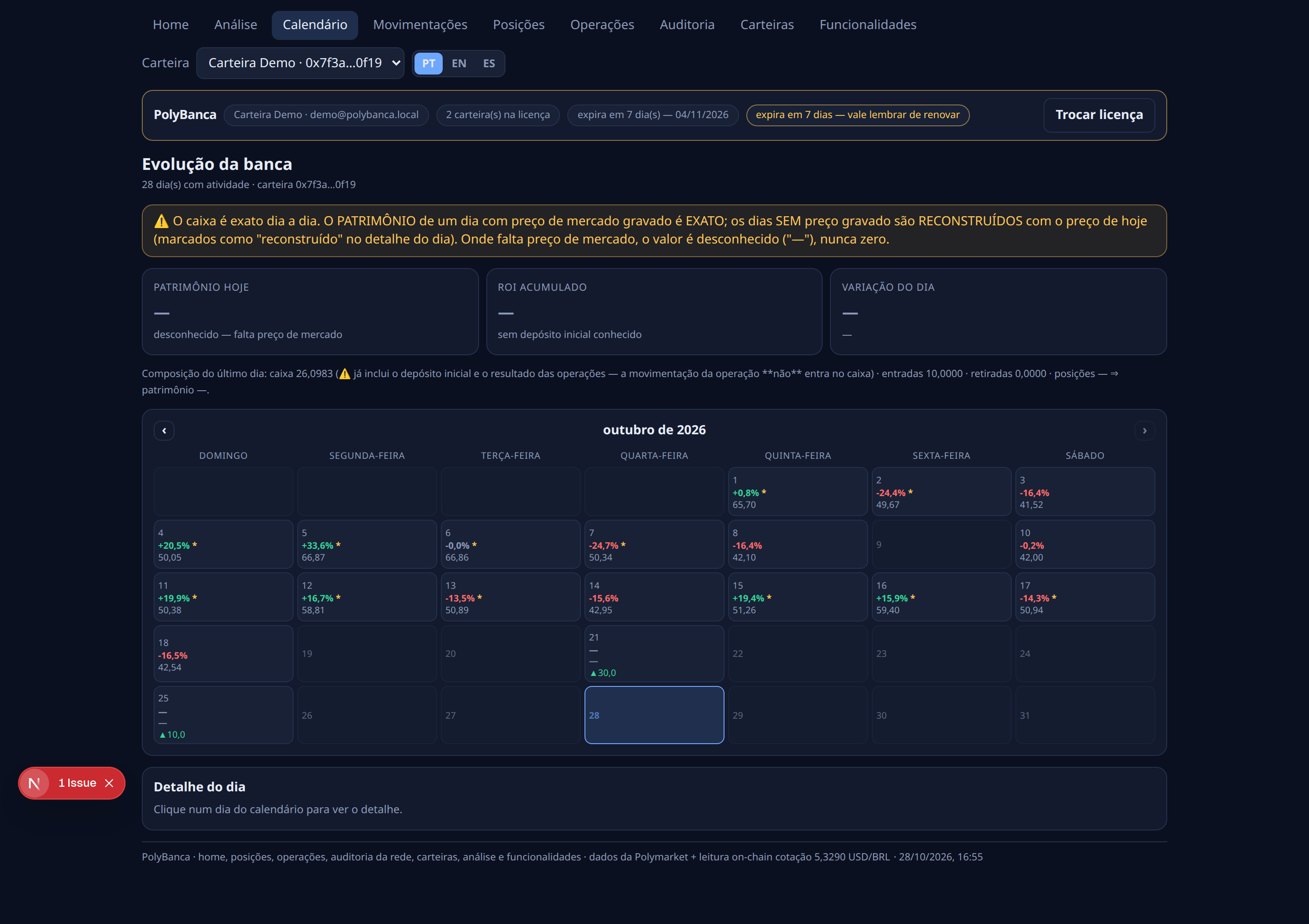
Calendar

The calendar shows the evolution of the book day by day: a 7-column grid, today highlighted, and the detail of each day with the variation in % and in pUSD (and in reais).

Careful: the recorded market price is today’s — Polymarket does not give a price history per operation. So the book of past days is a RECONSTRUCTION (exact only on the last day) and the app warns about that on the screen.

Where the market price is missing the value is “unknown” (—), never zero.

Calendar: the 7-column grid, the reconstruction banner and the unknown values marked with “—”.
Step 10

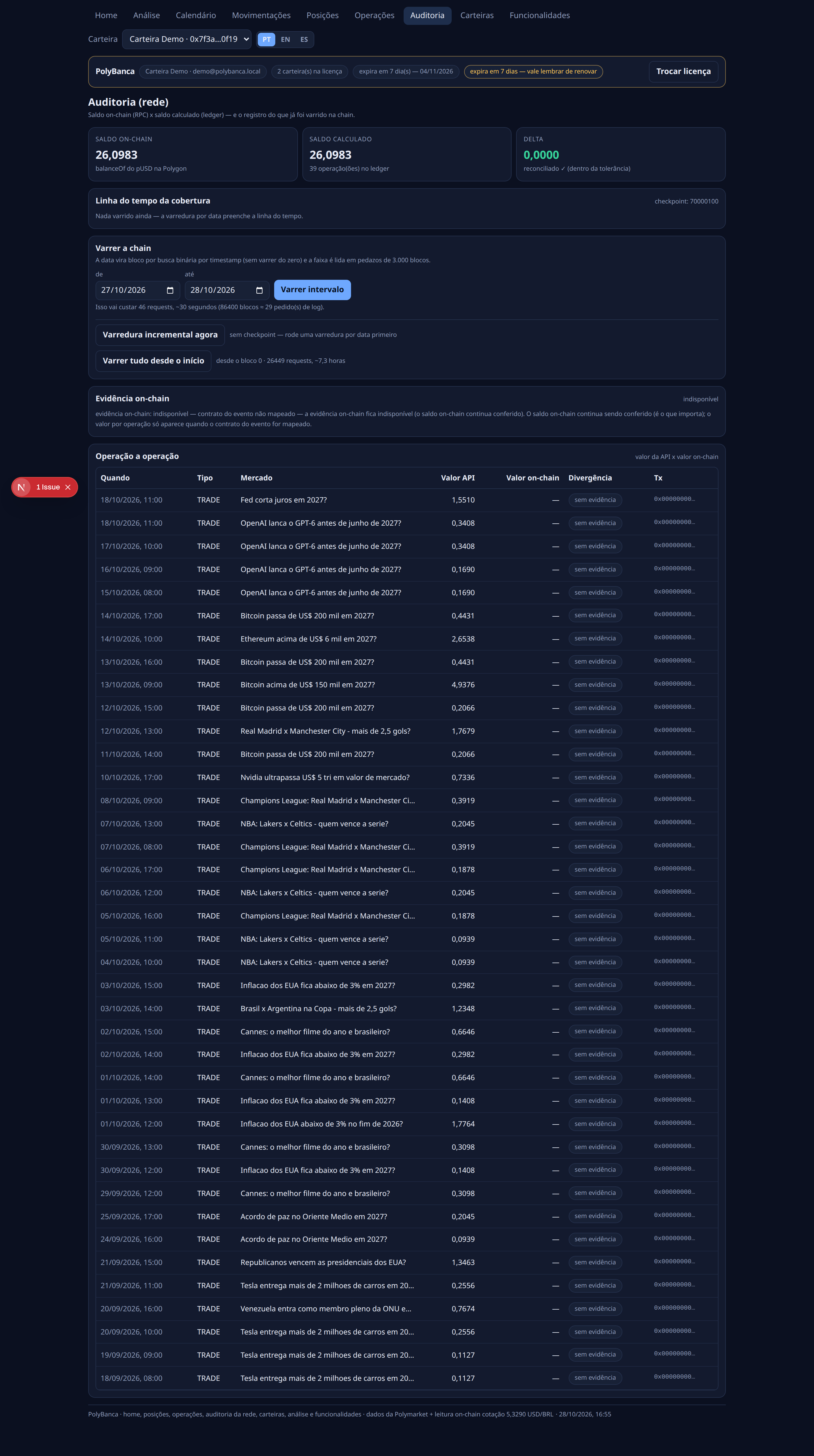
Audit

The audit confronts the on-chain pUSD balance (Polygon) with the balance calculated from the operations.

In the demo: on-chain 26,0983 × calculated 26,0983 ⇒ delta 0,0000, with the “reconciled” badge. This is the number that proves the app does not make money up.

The sweep goes block by block, and the public Polygon RPC limits the window per call ⇒ covering the whole history may take a few syncs.

Audit: on-chain 26,0983 = calculated 26,0983, delta 0,0000, “reconciled”.
Step 11

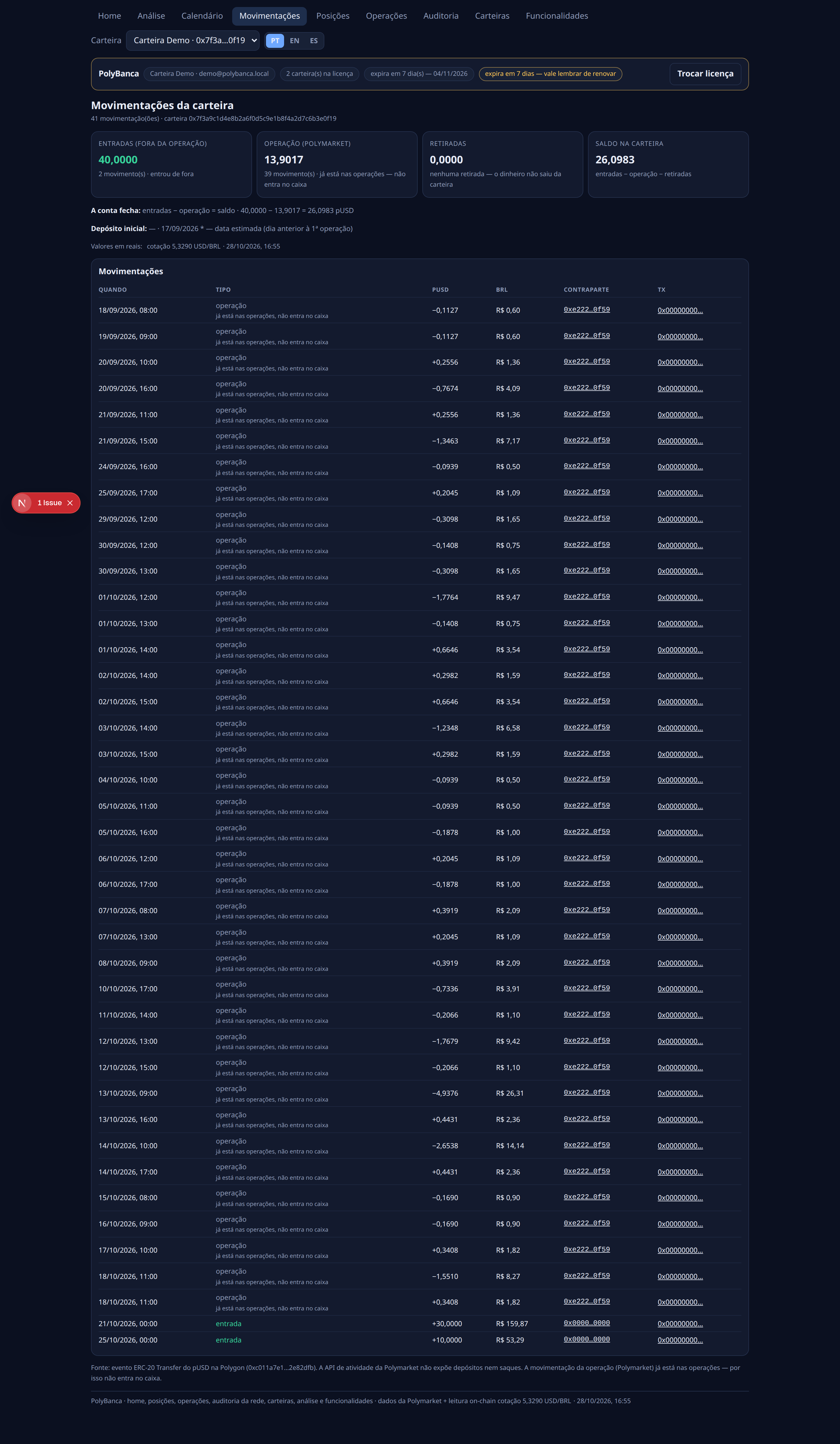
Cash movements

The movements screen splits the money into three classes: deposit (money coming in), operation (buy, sell or redemption) and withdrawal (money going out).

The account closes on the screen: 40,0000 − 13,9017 − 0,0000 = 26,0983 pUSD, exactly the on-chain balance.

An on-chain transfer is never counted as a deposit — it is evidence, not income.

Movements: 2 deposits, the operations, 0 withdrawals and the account that closes.

On the phone

The app is a PWA: add it to the home screen and it runs full screen, with the very same screens as the desktop.

The numbers do not change — what changes is the layout.

Home on the phone (390×844).
Positions on the phone (390×844).

What PolyBanca does not do

The honest limits of the app — what it does not do, and why.

Final checklist

Before you call PolyBanca “ready”, confirm:

Frequently asked questions

The questions that come up most on the first day.

Proxy wallet × MetaMask — which one do I paste?

The proxy wallet is the account Polymarket operates for you on Polygon: it holds your tokens and your history. MetaMask only signs and pays. Paste the proxy address.

Does the app touch my money?

No. It only reads: the public Polymarket API and a contract read on Polygon. There is no private key in the bundle, so there is nothing to sign.

Why did yesterday’s book change?

Because the recorded price is today’s — the past is reconstructed. When the real price history lands (it is scheduled), the day stops moving.

Why doesn’t the audit close on the first try?

The public RPC limits the window of blocks per call, so the sweep advances a little with every sync.

How many wallets can I add?

2 per license. To add more you need a new license.

Is there a Windows version?

It is scheduled — nothing has been compiled yet.

Subscribe to PolyBanca

10 USDC for 30 days. On-chain payment on Polygon. You get the activation link and can use it within minutes.